
An agentic AI company that ships agents which do the work, not chatbots that just talk about it
Most "AI companies" hand you a Q&A chatbot with a fresh label and call it an "agent." A real agentic AI plans, calls your tools, and finishes the job: updates the record, sends the follow-up, closes the ticket. The honest test is simple: does it do the work, or just talk about it? We build the kind that acts, and you own it.
What is an agentic AI company, and how is it different from a chatbot vendor?
A chatbot vendor sells you something that answers: you type, it replies, and a human still has to go do the actual task. An agentic AI company builds something that acts. It takes the goal, plans the steps, uses your tools, and completes the work itself.
- A chatbot returns text. An agent returns a finished task: a record updated, an email sent, a refund processed.
- An agent plans: it breaks a goal into steps and decides which tool to call for each one.
- It calls real tools (your CRM, helpdesk, database and APIs) instead of just describing what you should click.
- It verifies and reports: it checks its own output and hands off to a person when something is out of bounds.
That is the whole difference, and it is not cosmetic. Rewrapping a Q&A bot as an "AI agent" is the most common thing we see in the market right now. When you hire an agentic AI company, you are hiring for the second thing: a system that reduces the number of tasks a human has to touch, not one that just makes the talking prettier.
What can an agentic AI agent actually do end-to-end?
Not "chat about." Complete. Pick a task and watch the agent take the steps a person would, in your real tools, and finish.
Updates the CRM: reads a call note and changes the record itself, no data entry.
Sends the follow-up: drafts, checks against your rules, and actually sends it.
Processes a refund: verifies the policy first, then completes the transaction.
Moves a ticket: reads it, categorizes it, and routes it to the right queue.
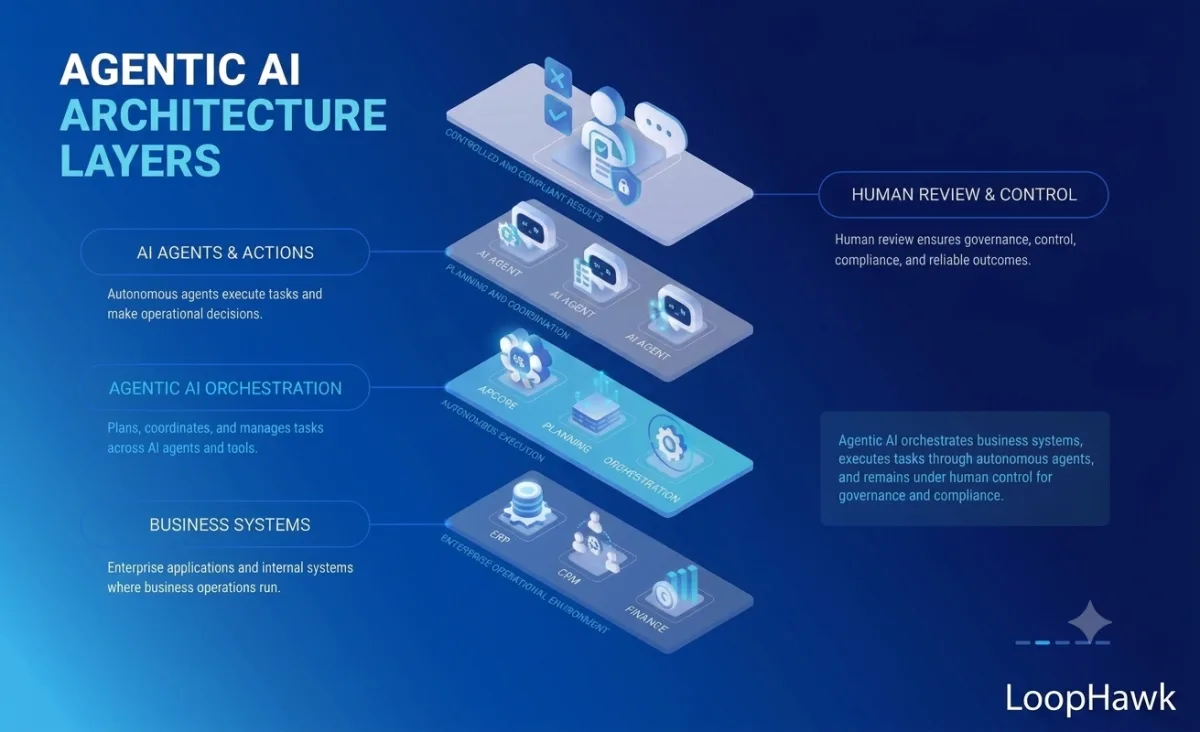
How does an agentic AI agent actually work?
No jargon. Three simple pictures: the loop that makes it act, the "plug" that lets it use your tools, and how several agents team up on a bigger job.
The agentic loop: goal → plan → act → check → done
Give it a goal. It plans the steps, uses your real tools, checks the result against your rules, and repeats until the job is genuinely finished.
Why it's "agentic": that loop (act, observe, adjust) is exactly what a one-shot chatbot reply can't do. A chatbot answers once and stops; an agent keeps looping until the task is actually done.
Agentic protocols (MCP): one secure "plug" into your stack
Instead of brittle, one-off integrations, a modern agent reaches your systems through a single standard connector, safely, and only where you allow.
- MCP = one standard "plug." The Model Context Protocol lets an agent securely use your tools and data through a single connector, not a tangle of brittle, one-off integrations.
- Secure and scoped. The agent only reaches the tools and actions you allow, through one gateway you can audit.
- No re-plumbing. Add or swap a tool behind the same connector instead of rebuilding custom glue each time.
Multi-agent: an orchestrator with specialist agents
For bigger jobs, several focused agents each do one thing well, coordinated by an orchestrator, with the same guardrails and human-in-the-loop as a single agent.
- Split the big job up. Several focused agents each handle one thing well (billing, support, research) instead of one agent doing everything.
- An orchestrator coordinates. It hands each step to the right specialist, then pulls their results back into one finished outcome.
- Same guardrails, human in the loop. Scoped permissions, approvals and an audit trail apply to every agent. A person still owns the calls that matter.
Why does the "AI" you bought still just answer questions instead of doing the work?
Nearly every disappointed "we tried AI" story traces back to the same gap: the tool can talk, but it was never wired to act. Here's why that happens, and what a real build fixes.
"It writes a great reply. Then a human still does the task."
Most "agents" stop at generating text. Nobody connected the model to your systems, so it can draft the refund email but cannot issue the refund. You bought the suggestion; the labor never left your team. A real agent is given tools and permission to finish, not just to advise.
"It has no access to our tools, so it can't actually change anything."
A chatbot lives in a text box. If it isn't connected to your CRM, helpdesk or database, the best it can do is describe the steps you should take. Wiring an agent into those systems, safely, with scoped permissions, is the hard engineering that most vendors skip and rename.
"It forgets the goal halfway and never finishes."
Completing a multi-step job needs a planner and short-term memory, not a single prompt. Without them, the "agent" answers the first turn and loses the thread on step two. We build the orchestration that keeps it on the goal until the task is genuinely done.
"We can't trust it to touch anything real."
That fear is fair, and it's usually the reason the tool was left in "answer only" mode. The fix isn't to keep it powerless; it's to add approvals, limits, an audit trail and a rollback path, so it can act on the safe 80% and escalate the rest to a person.
"It's a generic platform bot that doesn't know our process."
An off-the-shelf assistant is trained on the internet, not on your playbook. It gives plausible-sounding answers that don't match how you actually operate. A custom agent is grounded in your data and rules, so it takes the right action for your business, not a generic one.
Sound familiar? The "AI" problems we fix
If you're nodding at these, you didn't buy a bad idea. You bought a bot where you needed an agent. Here's each gap, and exactly how we close it.
You paid for "AI," and got a chatbot that only replies.
How we fix itWe connect it to your systems and give it scoped permission to act, so it finishes the task (updates the record, sends the email) instead of just drafting it.
Your team still does the tasks by hand after the "AI" replies.
How we fix itWe hand the repetitive, rules-based steps to the agent end-to-end, so the work leaves your team's plate instead of waiting in a queue for a person.
You can't tell a real agent from a slick demo.
How we fix itWe prove it live on your own data before you pay. You watch a record actually change, not a slide deck or a pre-recorded video.
It doesn't touch your CRM or helpdesk, so nothing real changes.
How we fix itWe integrate over MCP and plain APIs into your CRM, helpdesk, database and billing, acting with the exact permissions you grant, nothing more.
You rent a seat every month and never own the thing.
How we fix itYou own the build outright (the code, prompts, config and data) with no per-seat meter and no lock-in. Part ways with us and it keeps running.
You can't scale the busywork away without hiring more people.
How we fix itThe agent runs the routine work around the clock at consistent, on-policy quality, so volume can climb without adding headcount.
Agentic AI vs generative AI vs a chatbot. Which one did you actually buy?
The words get used interchangeably in sales decks, and that's exactly how buyers end up paying agent prices for chatbot capability. Here's the honest, plain-English split.
| Chatbot | Generative AI | Agentic AI | |
|---|---|---|---|
| What it does | Answers from a script or FAQ | Creates new text, code or images on request | Plans and completes a whole task |
| What you get back | A reply | A draft or a piece of content | A finished action, done in your systems |
| Uses your tools? | No. It just talks | Rarely: output goes to a human | Yes: CRM, helpdesk, DB, APIs |
| Finishes the job? | No, a human still acts | No, a human still acts | Yes, with guardrails & approvals |
| Best for | Simple deflection & FAQs | Drafting & ideation | Repetitive work you want off human hands |
The moving parts that make it act, not answer
An agent is more than a model. These are the pieces we engineer, the ones a rebranded chatbot is missing.
Planner
Breaks a goal into ordered steps and decides which tool to use for each: the difference between "reply" and "get it done."
Tool-calling
Function calls into your CRM, helpdesk, database and APIs, with typed inputs and validation, so it acts, not just describes.
Memory & context
Holds the goal, the steps taken and the results across a multi-step task, so it never loses the thread halfway through.
Grounding (RAG)
Reads your policies, playbook and records, so it takes the action that's right for your business, not a generic guess.
Verification
Checks its own output against your rules before it commits (amounts, policy limits, required fields), then reports what it did.
Observability
Every step, tool call and decision is logged to a dashboard, so you can see exactly what the agent did and why.

What are your options: DIY, off-the-shelf platform, or a custom build?
There's no single right answer, only the right one for your task, volume and team. Here's the honest trade on each, so you pick with eyes open.
| DIY build | Off-the-shelf platform | Custom build (LoopHawk) | |
|---|---|---|---|
| Speed to start | ✗ Slowest: months of build | ✓ Fastest: switch on | ~ Live in 2–4 weeks |
| Cost model | Cheap in cash, costly in engineer-months | Rent per seat, every month | Fixed build price, then it's yours |
| Fit to your exact workflow | ~ Only if you build it | ✗ Generic, bends to vendor | ✓ Built to your process |
| Who owns the code & data | ✓ You | ✗ Vendor's platform | ✓ You, outright |
| Who maintains it when it breaks | ✗ You, plus on-call | ~ Vendor's roadmap & queue | ✓ Us. Then you, if you want |
| Best for | Strong in-house engineers, low stakes | A common task, low volume, standard tools | A specific process you want owned |
Our honest bias: if your task is common and your volume is small, an off-the-shelf tool may be cheaper, and we'll tell you so.
What does an AI agent look like for a small, mid-size, or enterprise team?
Same idea at every size: an agent that acts, that you own. What changes is the scope, the guardrails and the budget. Here's the honest shape of each.
Small business
- One repetitive job, one channel
- Live fast, proven on your data first
- You own it outright
Mid-market
- Wired across a few core tools (CRM / helpdesk)
- Guardrails + monitoring built in
- You own the code, prompts & data
Enterprise
- Multiple agents + governance / audit across departments
- Human-in-the-loop on the calls that matter
- Dedicated delivery lead
Which industries do we build agentic AI for?
The pattern is the same everywhere: read a request, take the action, log it. Here's what that looks like across the industries we build for most.
E-commerce & retail
Processes refunds, updates orders and answers order-status questions across your store and helpdesk.
SaaS & technology
Triages tickets, syncs product data and routes bugs to the right queue automatically.
Professional services
Handles intake, scheduling and client-record updates across your CRM and calendar.
Healthcare
Manages scheduling, reminders and record updates, with audit trails, PII handling and human review built in.
Financial services
Reconciles, flags exceptions and updates systems, with full audit logging and human approval on key actions.
Logistics & travel
Tracks shipments, updates statuses and resolves booking changes across your APIs.
How do you tell a real agent from a chatbot in a sales demo?
Slides and demo videos hide the gap. There's one move that exposes it every time: ask the "agent" to actually take an action, and watch whether anything changes in a real system.
Make it do the work in the room
A chatbot will happily describe the steps. A real agent will perform them, and you'll see a record change, an email leave, a ticket move. If the vendor can only show text, you're looking at generative AI in an agent costume.
How does an agentic system take action safely: guardrails, approvals, human-in-the-loop, rollback?
Giving an agent the power to act is exactly why it needs limits. Autonomy without control is a liability; the engineering is in the controls, and it's where we spend real time.
Scoped permissions
The agent gets least-privilege access to only the tools and actions its task needs, never a master key to your whole stack.
Least privilegeApproval gates
High-stakes or high-value actions pause for a human "yes" before they run. You set the thresholds, per action and per amount.
You set the limitsHuman-in-the-loop
The agent handles the safe, routine cases and escalates anything ambiguous or out-of-policy to a person with full context.
Escalate on doubtRollback & undo
Actions are reversible where the system allows, and every change is logged so a mistaken step can be found and unwound fast.
Reversible by designAudit trail
Every plan, tool call, input and result is recorded, so you always have a full, reviewable account of what the agent did.
Full accountabilitySandbox & testing
It's hardened against your real cases in a safe environment first, including the edge cases and the "what if it's wrong" paths, before it ever touches production.
Proven before liveHow does LoopHawk build, prove, and hand over your agentic AI?
The proof comes before the invoice. You watch an agent complete a real task on your own data first, built by a US-registered LLC with a senior global team, so you get US accountability at global rates. Our approach is the same custom AI agent development we bring to every build, no black box.
Scope + free live proof
Pick one real task. We build a working agent that completes it on a sample of your data, at no cost, so you see it act before you decide.
Design & itemized quote
Your task, tools, rules and approval thresholds mapped; a fixed price by line item and the honest running cost, up front.
Build, integrate & guard
Tool connections, planner, grounding and guardrails wired in, monitored and logged from day one, tested against your edge cases.
Prove, ship & hand over
Hardened on your real workflow, then handed to you. The code, prompts and data stay yours. Optional ongoing tuning if you want it.
Does it plug into the tools you already run: CRM, helpdesk, database, APIs?
An agent is only as useful as its reach into your systems. That reach is exactly where a custom build pulls ahead of a locked-down platform. If a tool has an API, an agent can be taught to act in it.
| Where it connects | What the agent does there |
|---|---|
| CRM | Reads and writes records, updates deal stages, logs activity, creates and completes tasks (HubSpot, Salesforce, Pipedrive and more). |
| Helpdesk | Triages, tags, prioritizes, routes and resolves tickets, and posts internal notes with full context (Zendesk, Freshdesk, Intercom). |
| Database & internal apps | Queries and updates your own systems over their APIs, respecting the same permissions your team works within. |
| APIs & webhooks | Calls any service that exposes an API (billing, shipping, e-sign, internal microservices) and reacts to events as they fire. |
| Email & calendar | Sends, replies, schedules and books, on your rules and within your send limits, no over-messaging. |
Who owns the agent when it's built, you or the vendor?
You do, completely. When we hand over, the code, the prompts, the configuration and your data are yours to keep, run and change. That's the core difference between a custom build and a SaaS seat: you're buying a system, not a login.
Why it matters. An agent you own means:
- No per-seat meter that climbs as you scale
- No vendor roadmap deciding what it's allowed to do
- No lock-in trapping your process inside someone else's product
- Part ways with us and it keeps running, because it was always yours
What "you own it" means
- The full source code and prompts, handed over, documented
- Your data stays in your systems, under your control
- Built on open frameworks another team could maintain
- No per-seat fees, no usage lock-in, no black box
What renting a seat means
- You pay per seat or per action, every month, forever
- Your process is limited to the vendor's roadmap
- Your data lives inside their platform
- Stop paying and the capability disappears
What it means when your AI actually acts
An agent that completes tasks doesn't just save a few clicks. It changes the arithmetic of how the work gets done.
Tasks leave human hands
The repetitive, rules-based work a person was doing manually gets completed by the agent, freeing your team for the judgment calls only they can make.
Work happens around the clock
Refunds, updates, routing and follow-ups get finished at 2am and on weekends, no queue waiting for Monday, no backlog building overnight.
Consistent, on-policy actions
Every task done the same way, against the same rules, with an audit trail, no bad days, no skipped steps, no records left half-updated.
How much does agentic AI development cost?
Real ranges from our own cost guides. Not a subscription you rent. You own everything we build: no seat fees, no lock-in. The final price is fixed on a scoping call, with the full running cost shown up front.
Single-task agent
- One action, completed end-to-end
- Wired to the one tool it needs
- Proven on your real data first
- You own it, no lock-in
Multi-step agent system
- Chains several tools together
- Plan → act → verify → report
- Guardrails, approvals & audit trail
- Monitoring & dashboard from day one
Multi-agent / department
- Several agents working together
- Deep integration across systems
- Governance, RBAC & audit
- Dedicated delivery lead
Agentic AI company: your questions
Is agentic AI just a chatbot with a new name?
No, and that's the exact confusion vendors profit from. A chatbot answers a question and stops; an agentic system plans a task, calls your tools, and completes it: a record actually changes, an email actually sends. The plainest test is what happens after it runs: with a chatbot a human still does the work, with an agent the work is done. Anything sold as an "agent" that only returns text is a chatbot in a costume.
How do I know a vendor's "agent" actually takes action?
Ask them to make it act on something real, live, in the room. A true agent will change a record, send a message or move a ticket in an actual system while you watch; a rebranded chatbot can only describe the steps you should take. Also ask what happens when it's wrong and whether you'll own it. Real builders answer by showing you, not by talking around it. If every demo is a video or a slide, treat that as your answer.
What's the difference between an agentic AI company and a chatbot company?
A chatbot company ships something that talks: scripts, replies, deflection. An agentic AI company designs systems that do work: they plan, use your CRM, helpdesk, database and APIs, complete a task end-to-end, and stay inside guardrails you set. The engineering is different too. An agent needs a planner, tool-calling, memory, verification and controls that a chatbot never has. You're hiring for outcomes completed, not conversations held.
What tasks can an agent complete without a human?
Routine, rules-based work with a clear right answer is the sweet spot: updating CRM records, sending and logging follow-ups, triaging and routing tickets, processing refunds within a set limit, syncing data across tools. You decide where the line sits: the agent handles everything inside its permissions and thresholds, and escalates anything ambiguous or high-stakes to a person. In practice most teams let it run the safe majority of a task and keep a human on the exceptions. That balance is a setting you control, not something fixed.
What happens when the agent gets something wrong? Can it be stopped or rolled back?
Yes. Actions are logged step by step, high-stakes ones pause for human approval before they run, and changes are reversible wherever the underlying system allows it. If something slips through, the audit trail shows exactly what happened so it can be found and unwound quickly, and you can pause the agent at any time. We test against the "what if it's wrong" paths in a sandbox before it ever touches production. The point of guardrails is that a mistake is contained, visible and fixable, not silent.
Do I own the system you build or rent it?
You own it, fully. On hand-over the source code, the prompts, the configuration and your data are yours to keep, run and modify, built on open frameworks another team could maintain. There are no per-seat fees and no usage lock-in. If we ever part ways, the agent keeps running because it was always yours. That's the core difference between a custom build and a SaaS seat.
Can an agent work across several tools at once (multi-step)?
Yes. That's exactly what separates an agent from a single-tool bot. It can read a request in your helpdesk, look up an order in your database, issue a refund through your billing API, email the customer, and log it all in your CRM as one connected task. The planner decides the order of steps and the tool for each, and verification checks the result before it commits. Multi-step, multi-tool workflows are the "Most teams start here" tier for a reason.
How much does a custom agentic agent cost?
A single-task agent that proves one action end-to-end starts from about $1,800. A multi-step system wired across your stack with guardrails typically runs $8K–$35K, and a multi-agent or department-wide build starts from $40K. Optional tuning and monitoring is available from $200/month: upkeep on a system you own, not a fee to use it. You get an itemized quote and a live proof on your data before you pay anything.
How long before a working agent on my own data?
Most focused agents are live in about 2–4 weeks, and you'll see one complete a real task on a sample of your data within the first conversation, free, before any commitment. Larger multi-agent builds take longer and we'll give you an honest timeline up front. The free proof isn't a mockup; it's a working agent acting on your actual workflow. We'd rather show you it works than ask you to take it on faith.
Do I need to be an enterprise to hire you?
No. The single-task tier exists precisely so a small or mid-sized team can prove value on one real job without an enterprise budget. Plenty of the best first projects are a single agent aimed at one repetitive task that's eating your team's time. You can start small, see it work, and expand from what's already paying off. We build for where you actually are, not where a sales quota wants you to be.
How is this different from an off-the-shelf agent platform?
An off-the-shelf platform is fast to switch on and fine for a common, low-volume task with standard tools, but you rent it per seat, it bends to the vendor's roadmap, your data lives in their product, and it rarely fits a non-standard process. A custom build is designed around your exact task and systems, fits your workflow, has no per-seat meter, and you own it outright. If your process is generic we'll honestly point you to a platform; custom pays off when the process is specific, the volume is real, or the rent has started to hurt.
How do you keep an autonomous agent within its permissions?
Least-privilege access is the foundation: the agent only ever gets the specific tools and actions its task requires, never a master key. On top of that sit approval gates for high-value actions, thresholds you set per action and per amount, and an audit trail that records every call it makes. Sensitive or ambiguous cases are escalated to a human rather than acted on, and everything is validated against your rules before it commits. Autonomy is bounded by design. That's what makes it safe to give an agent real power.
See an agent act on your use case
Name one real task and the tools it touches. We'll build a working agent that completes it on your own data, then walk you through it live. No cost, no commitment, and you own whatever we build.
Multi-Agent Systems
Coordinated agents, right-sized. Not an over-engineered swarm.
Explore →Generative AI Agents
Agents that act on your data, not just draft.
Explore →Custom AI Agent Development
A custom agent you own, proven in a demo before you pay.
Explore →Enterprise AI Agents
Governed agents with audit trails that clear security review.
Explore →AI Automation Agency
Automations rebuilt as agents that don’t break at 2 a.m.
Explore →AI Agent Consulting
Honest advice on where agents pay off, and where they don’t.
Explore →AI Agent Frameworks
LangGraph, CrewAI or Microsoft Agent Framework. And why the choice outlives the project.
Explore →AI Agent Companies
How to choose one, the four vendor types, and what each is bad at.
Explore →